The 10 Best Meeting Minutes Software in 2026
Sanduni
Growth Content Editor

I compared 10 meeting minutes software tools: Jamie, Fellow, Fireflies.ai, Avoma, Otter.ai, ClickUp, tl;dv, MeetGeek, Fathom, and OnBoard. And I compared these meeting minutes software tools on whether they produce the minutes or hand you a transcript, whether the recording is kept afterwards, whether a bot joins your call, whether they capture in-person meetings, how good their data security is under GDPR, and how affordable they are.
We conducted our own accuracy tests with respect to Jamie and four other AI note takers. For each of the three tests, speaker identification, transcription, and the AI summary, Jamie achieved scores of 98, 90 and 90. Consequently, Jamie ranked first out of the five.
Ultimately the question will be the same: whether it is your responsibility to take minutes at a board meeting or for a weekly committee, what is the best meeting minutes software? This article shows you 10 of them.
Jamie makes capturing and sharing meeting insights effortless and fast.

Oney Insurance
Insurance · 1.001-10.000 employees
TL;DR
- Jamie: Best Overall Meeting Minutes Software, Bot Free With Permanent Audio Deletion
- Fellow: Best Meeting Minutes Software for Zero Day Deletion
- Fireflies.ai: Best Meeting Minutes Software for Search Across 100+ Languages
- Avoma: Best Meeting Minutes Software for Sales Coaching and Revenue Intelligence
- Otter.ai: Best Meeting Minutes Software for Asking Questions Across Your Meetings
- ClickUp: Best Meeting Minutes Software for Turning Decisions Into Assigned Tasks
- tl;dv: Best Meeting Minutes Software for Customizing Your Summary Format
- MeetGeek: Best Meeting Minutes Software for 100+ Languages and 30+ Templates
- Fathom: Best Meeting Minutes Software With Unlimited Free Recordings
- OnBoard: Best Meeting Minutes Software for Board Motions, Votes and Approval
What Are the Best Meeting Minutes Software?
The 10 best meeting minutes software tools are Jamie, Fellow, Fireflies.ai, Avoma, Otter.ai, ClickUp, tl;dv, MeetGeek, Fathom and OnBoard. All ten record a meeting and turn it into a written summary with action items. Jamie records from your own device on every plan and generates the minutes with each speaker named. Jamie then deletes the meeting audio after transcription, with all meeting data stored in Europe under GDPR. Fathom, Fellow, MeetGeek, Otter.ai and tl;dv also record without a bot, and tl;dv stores its recordings in the EU.
Here is how Jamie, Fellow, Fireflies.ai, Avoma, Otter.ai, ClickUp, tl;dv, MeetGeek, Fathom and OnBoard compare. Click any row to open the longer answer.
1. Jamie: Best Meeting Minutes Software, Bot Free With Permanent Audio Deletion
Best for: Jamie is the meeting minutes software for a European team that wants templates, Ask AI and permanent audio deletion.
Similar to: Fellow, MeetGeek, Krisp
Jamie is a bot-free meeting minutes software. Jamie generates minutes using recordings made directly from your own device. All speakers are identified, and all meeting data is stored within Europe, where it falls under the General Data Protection Regulation (GDPR). We created Jamie for the conversations that would be inappropriate and intrusive to include a third-party bot in your private and confidential meetings. With Jamie being a complete bot-free meeting intelligent AI tool, you can gain consent and inform the room about Jamie taking notes for you in one of three methods. And once the transcript is generated, the recording of the meeting is permanently deleted for utmost privacy. Let's look at some of Jamie's key features.
Jamie Generates the Minutes, With the Decisions and the Action Items Already Separated
Jamie generates meeting minutes from the conversation with groups for the topics discussed during the meeting, decisions made, and each action item given an owner. We created executive-level AI notes to hand you a documented version of the meeting instead of the unedited raw talk. Once the recording has been stopped, the executive summary, the action items, and the full transcript will appear in your Jamie workspace. Before your committee reads a word of it, you will want to know about Jamie's executive summary, how we pull the action items out, and if you can ask Jamie about a decision taken months ago:
Executive summary
You'll receive the minutes written like someone actually wrote them, with the topics grouped together, decisions clearly stated and quotes included. The document is easily understandable to anyone who wasn't at the meeting, on every plan.
Action items
And you'll receive the individual action items on their own. Each action item carries the owner of the action item. On every plan you can check off one that's completed, edit one if needed, or enter one that Jamie missed.
Ask AI
If someone asks what the committee decided regarding the budget, you put that question to Ask AI. It pulls the answer from every meeting you have recorded, on every plan.
Jamie Deletes the Meeting Audio Once the Transcript Exists, and Trains No Model On It

Jamie deletes the audio after transcribing the meeting, and your meeting data is never used to train a model. We made this decision based on how we think about the longevity of a meeting's recording and the potential liability associated with a recording of an unstructured conversation. A longer tail equates to greater risk. Once your minutes are approved, the published governance advice is to get rid of the recording, and you will want to know what Jamie does with the audio, if we train our models on your meetings, and how long anything is kept:
Permanent audio deletion
Your meeting audio will be deleted once your transcription is complete. This aligns with what the Chartered Governance Institute recommends for a board recording. The approved minutes will now become the permanent record.
No model training
Your meeting data will not be used to train models, not by us and not by any of our model providers, on every plan including the free one.
Data retention
On the Enterprise plan you're able to define retention rules to determine how long your meeting data will remain stored on Jamie and when it is deleted. These retention rules are accompanied by audit logs.
Jamie Is GDPR Compliant and ISO 27001 Certified, With All Meeting Data Stored in Europe
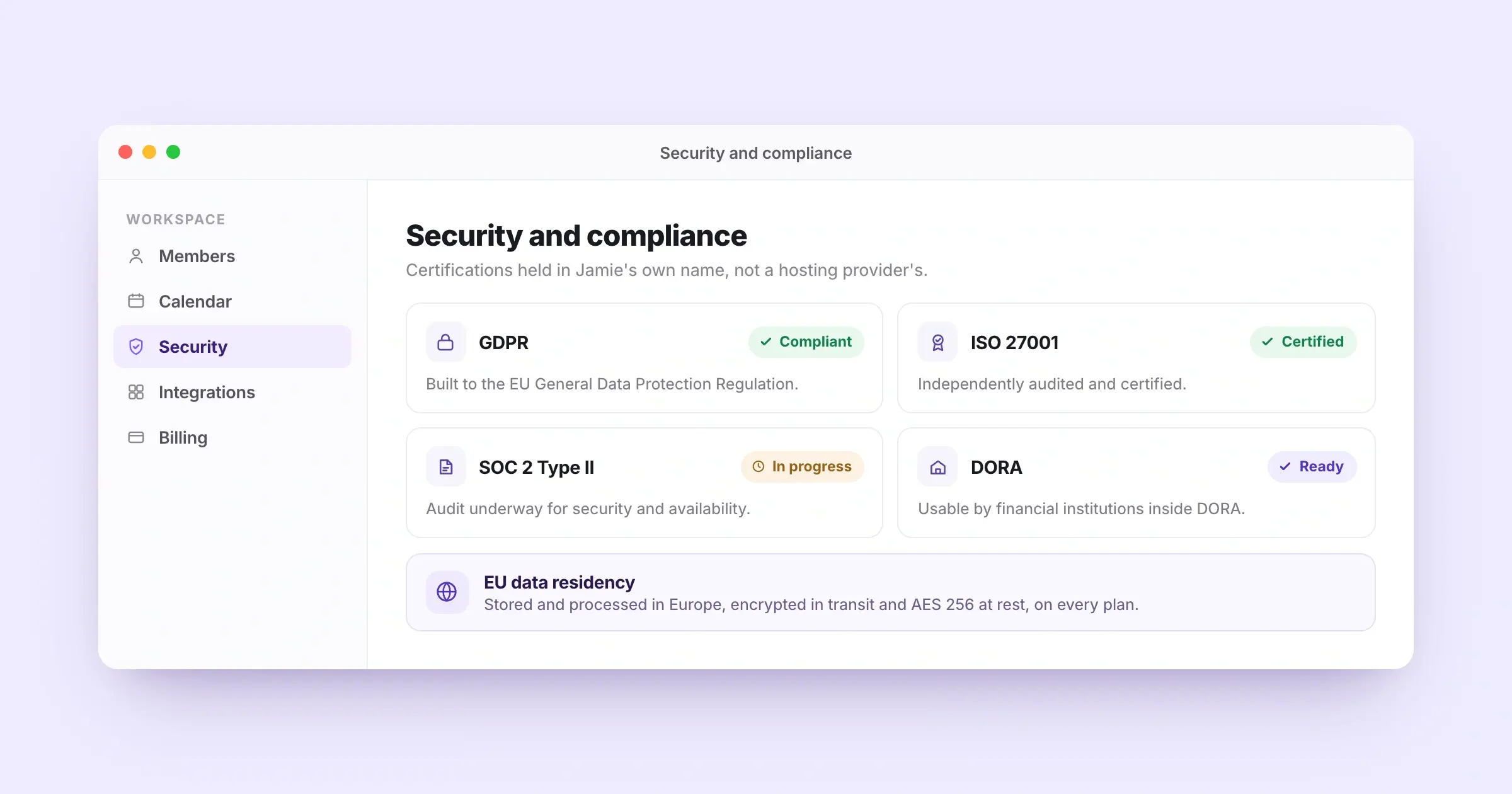
Jamie is GDPR compliant, and we have an independent certification to ISO 27001. All of your meeting data is processed and stored within Europe. We've obtained the certification ourselves; it isn't through a third-party hosting provider. Your compliance officer doesn't have to wait for the vendor to provide evidence during the signing process. If your legal or IT team has to approve a minutes tool before anyone installs it, you will want to know about our GDPR position, if Jamie holds ISO 27001, if we are DORA-ready, and where your meeting data actually sits:
GDPR and ISO 27001
Built to meet the requirements of the EU General Data Protection Regulation, or GDPR, and independently certified to ISO 27001, Jamie has a security page where these certifications are explicitly stated. Therefore, no additional contact needs to occur with us before your data protection officer reviews them.
SOC 2 Type II
The SOC 2 Type II audit for our organisation is currently being conducted according to the Trust Services Criteria for Security and Availability. The audit process is in progress and has not been completed as of yet.
DORA
If you're a bank, fund or insurer subject to the Digital Operational Resilience Act, Jamie is DORA-ready. That means a financial institution inside DORA can use Jamie as a technology provider.
EU data residency
Regardless of your plan level, including free, all of your meeting data will be encrypted in transit, and AES 256 when at rest.
Jamie Discloses the Recording Three Ways: Verbal Consent, an Email Notice and a Chat Notice
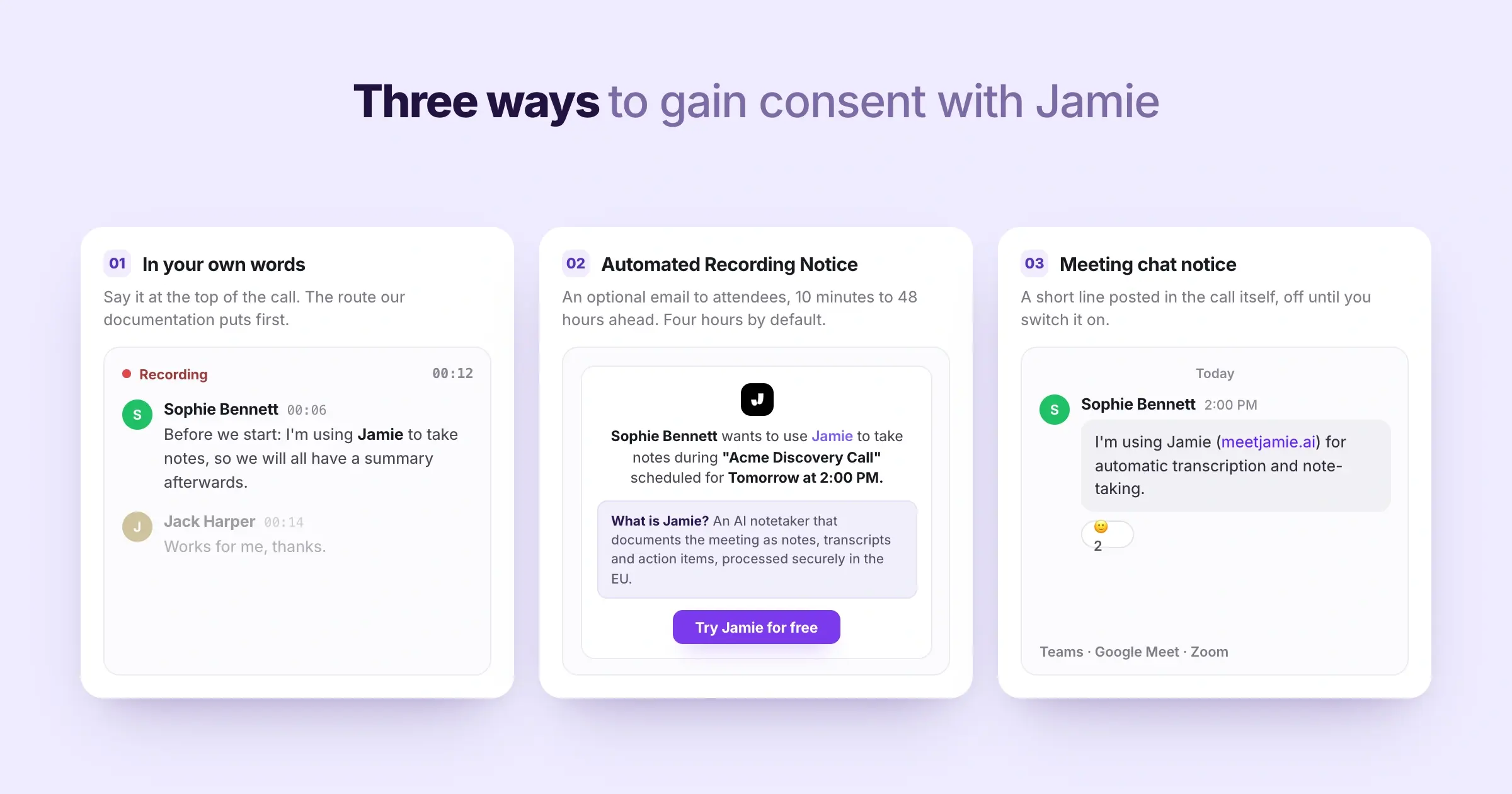
There are three options available to you regarding disclosing recordings to those attending your meeting. Because you are acting as the data controller, we give you the ability to choose how you would like to handle disclosing that a meeting was recorded. Section 201 of Germany's Criminal Code stipulates that recording the non-publicly spoken word without authorisation is against the law. And if your minutes cover a meeting with anyone outside your own company, you will want to know what you say out of your own mouth, if we can email your attendees beforehand, and if Jamie can post a notice inside the call:
Recording consent
You can explain how you want participants informed of the recording at the beginning of the meeting. This is also listed as the preferred method on our documentation. Our documentation explicitly states that the responsibility of informing attendees rests with you.
Automated Recording Notice
You can enable the optional Automated Recording Notice email that sends an email to your attendees anywhere from 48 hours prior to the start of the meeting down to 10 minutes prior to it. The default setting is 4 hours prior. Nothing goes out until you enable it.
Meeting chat notice
You can enable the meeting chat notice that posts a short message during the call on Microsoft Teams, Google Meet and Zoom. This feature is available in beta today and disabled by default until you enable it.
Jamie Records the Board Meeting Held in a Room, With No Device on the Table
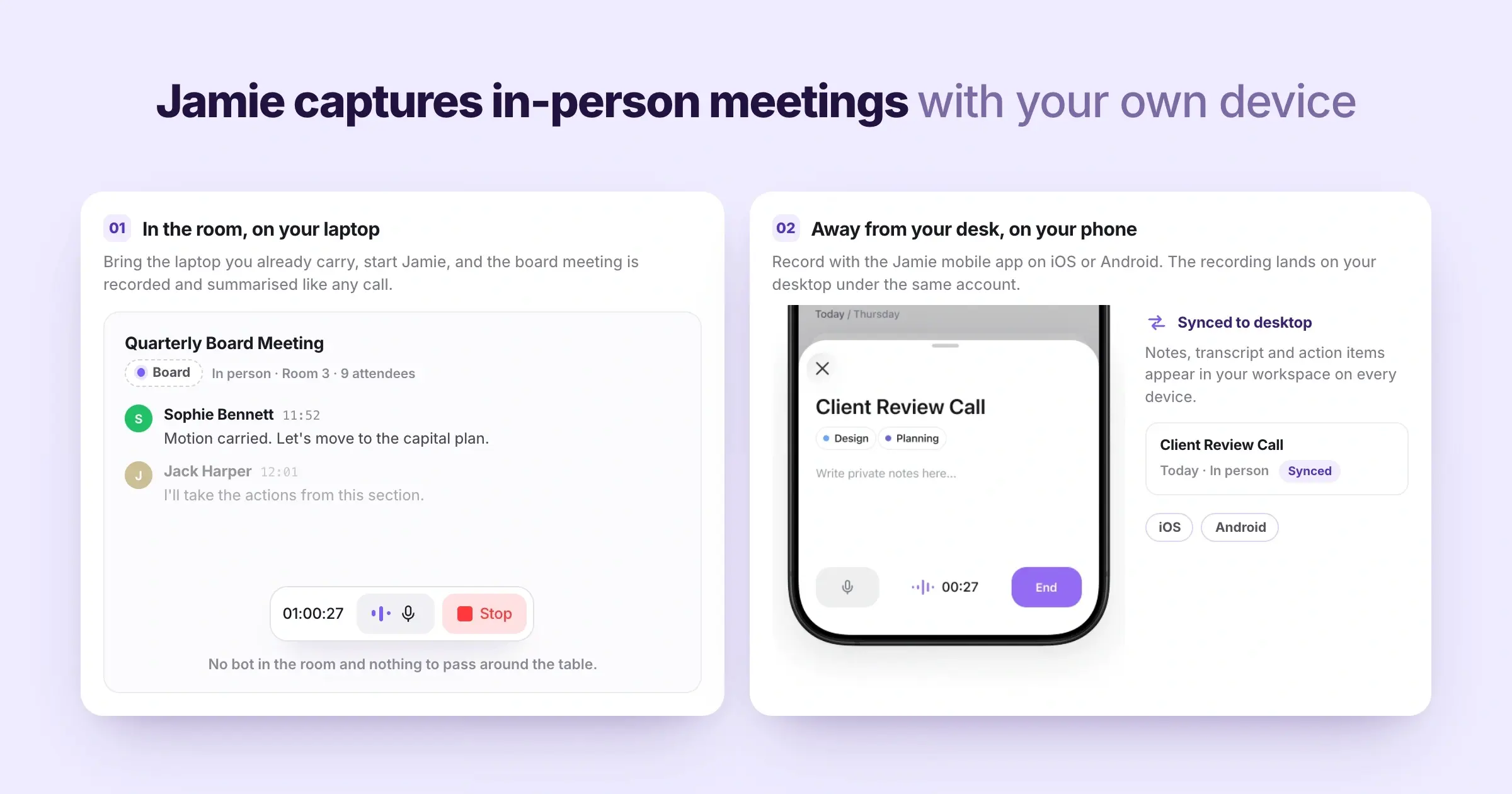
Jamie records meetings, both in person and via video call, for all of your plans. This recording process has been created by us to be used right on your own computer or phone. Board meetings, annual general meetings, works council meetings and others like them are recorded the same way as your video calls. Whenever the meeting you have to minute is held around a table, you will want to know if Jamie records in-person meetings and how it works on your mobile phone:
In-person meetings
In addition to using a laptop that you have brought with you to the table, you will start Jamie. The meeting is then recorded and summarised the same way as a call would be, on every plan including the free one.
Mobile app
You can also use the microphone on your mobile device, whether it is iOS or Android; when you do so, the recording is synced back to your desktop from the same account.
Jamie Shapes Every Set of Minutes to the Template You Choose Once
Jamie creates the summaries from the templates, and this allowed us to develop templates for the house format, as opposed to needing to create new ones each month. Jamie is agentic, which means that our Agent takes action with respect to what you've told it, based on your own word instruction. For a committee that publishes a record its members compare month to month, you will want to know about our templates, how many you can build, and if you can write your own instruction once and leave it:
Templates
You can select which sections of the minutes are included. On all plans we offer 30+ pre-built templates. For Free users, there is 1 custom template. There are 3 custom templates offered to Plus users. Unlimited custom templates are offered to Pro users. Custom templates are also shared across Team and Enterprise plans.
Agent Skills
After you create your own instructions, in your own words, Jamie's Agent will run them after the meeting. Jamie waits for your approval until you tell it to run without asking. This is the part of Agentic Intelligence in Jamie that you configure yourself rather than clicking each time. Workflows are still rolling out workspace by workspace.
Jamie Identifies Each Speaker by Name and Speaker Memory Remembers the Same Voice Later
Jamie identifies all speakers by name, and Speaker Memory remembers those voices in your upcoming meetings. We developed speaker identification and memory since minutes need attribution. A record containing "Speaker 1" and "Speaker 2" cannot determine who made an objection, nor can they tell who made a proposal. After a committee of eight people has talked across itself for an hour, you will want to know about speaker identification and memory, and if you can watch the transcript while the meeting runs:
Speaker Memory
If you identify a single participant's voice once, then Speaker Memory remembers that voice for future meetings. This means the next batch of minutes includes actual names instead of numbers when documenting decisions on every plan.
Live Transcript
You may view the Live Transcript of a meeting while it is occurring. Your own notes can be placed adjacent to the Live Transcript in the Scratchpad, denoting the point at which a decision was finalised.
Jamie Starts Free, With 10 Meetings a Month and Unlimited Ask AI
Jamie's free plan covers 10 AI notes a month at 30 minutes a meeting. We added Ask AI, speaker identification and memory, in-person meetings, over 100 languages, and the European hosting to all plans. The Free Plan is the product, not a demo. Now, if you are minuting for a committee that has no budget for it, you will want to know what each plan costs a month:
- Free: 0 euro per month
- Plus: 25 euro per month
- Pro: 47 euro per month
- Team: 39 euro per seat per month
- Enterprise: Custom pricing
Prices read on meetjamie.ai/pricing on 19 September 2026 with the Monthly toggle on.
Jamie Sends the Minutes to Google Docs, Notion, OneNote and Your CRM
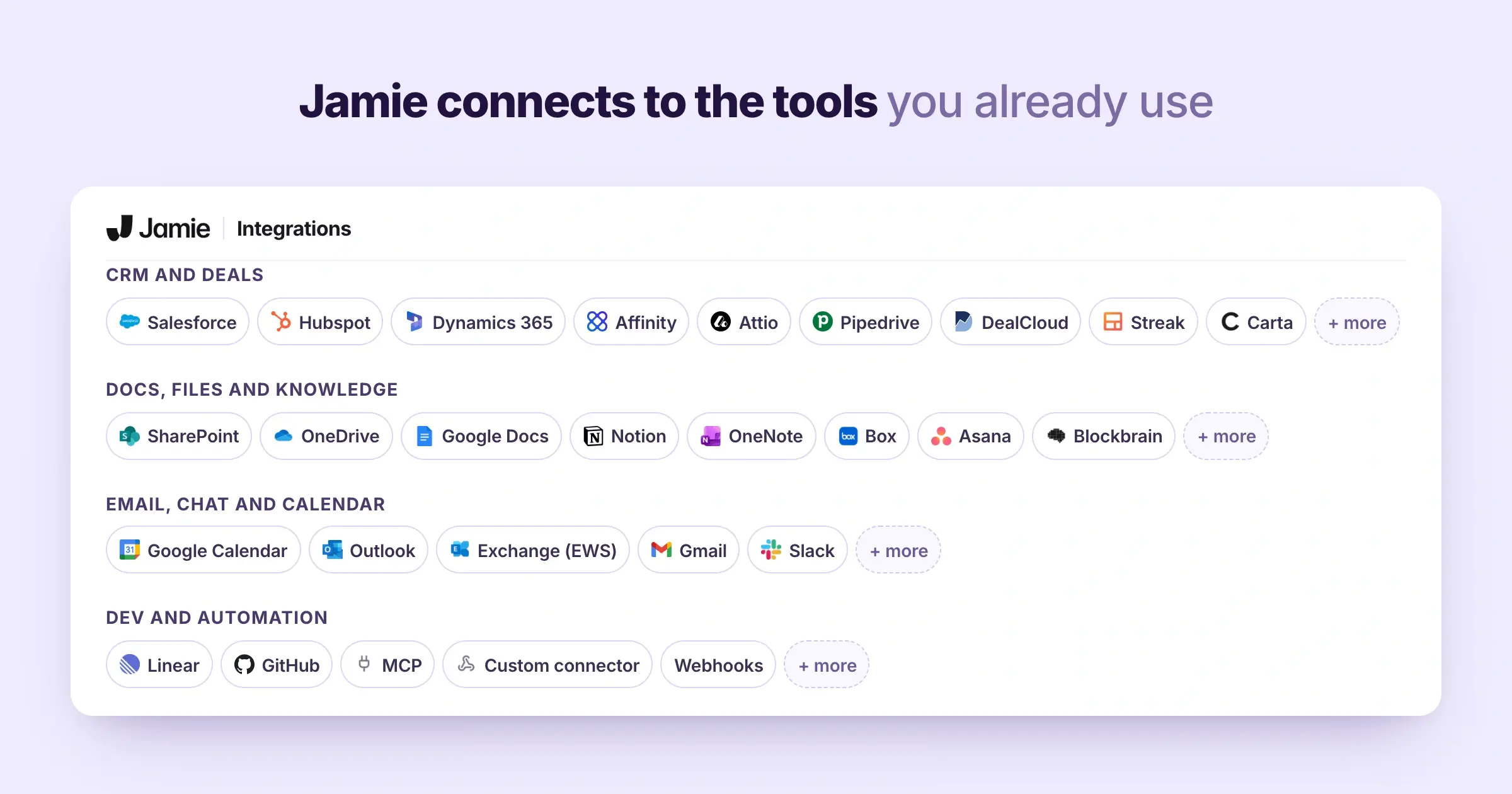
Jamie then sends the completed minutes to where your organisation currently houses them. Once you enable the Plug and Play Integrations switch in Settings, Jamie will automatically drop the notes from each of your meetings into either Google Docs, Notion or OneNote. That happens after each meeting, without having to manually copy anything. Say the minutes have to live somewhere other than your notes app, you will want to know which tools we currently support, what your plan reaches, and if you can pull the notes into your own AI tools:
Integrations
On every plan, you may integrate your Google Docs, Notion and OneNote accounts. From Pro onward, you may also integrate your Asana, Salesforce, HubSpot, Attio, Dynamics 365 and Pipedrive accounts. DealCloud is integrated on Team. Affinity is integrated on Enterprise.
MCP
You can also access your own meeting notes from Claude, ChatGPT or Cursor via our MCP Server on Pro and above. The API and webhooks are available alongside it.
What Jamie users love
Bot free capture, with no awkward bot on the call
“I like Jamie because it's a bot-free AI note-taker that can take notes without an awkward bot on the call.” Verified User in Design, G2
Hebrew, multilingual conversations, online and in person
“Finally an app that… Understands Hebrew. Jaime is also a life saver for: Multi lingual conversations [and] Offline and online meetings.” Rachel C., G2
What Jamie users flag
The free plan stops a meeting at thirty minutes
“The 30min meeting limit, but I understand that's the business model ;)” Charlotte Z., G2
Audio quality in the room changes what the notes come back like
“Jamies features are outstanding, sometimes I had the feeling that my audio quality heavily impacts the outcomes, which I need to adapt from my side.” Verified User in Computer Software, G2
2. Fellow: Best Meeting Minutes Software for Zero Day Deletion
Best for: Fellow is the meeting minutes software for a regulated team that needs recording policies and retention set centrally across the workspace.
Similar to: Jamie, Avoma, Otter.ai

Source: Fellow
Fellow is an AI note-taker that records your calls. It helps you build agendas, track decisions, assign tasks, and follow up after meetings.
Fellow's key features

Source: Fellow
- Bot or botless: Fellow's bot joins Google Meet, Zoom and Teams, botless any platform.
- Configurable retention: Fellow supports zero day deletion across the whole workspace.
- Consent capture: attendees agree before an auto recorded meeting, on Enterprise with Microsoft 365.
- Ask Fellow: You question your meetings, or connect them to ChatGPT and Claude.
- Workspace Audit Log: Enterprise admins track logins, settings changes and integrations.
Fellow's pricing
- Free: 0 dollars per month
- Solo: 29 dollars per month
- Team: 11 dollars per user per month
- Business: 23 dollars per user per month
- Enterprise: 25 dollars per user per month, billed annually
What Fellow users love
Easy to use between back to back meetings
“Fellow is genuinely easy to use, which matters a lot when you're jumping between back to back meetings all day.” Lauren H., G2
The recordings catch you up on the meetings you missed
“They make it quick and easy to find context for my work, and they also help me stay involved in meetings I may not have attended.” Gabe H., G2
What Fellow users flag
One reviewer says recordings sometimes get lost afterwards
“The loading times for summaries are slow, and I also run into periodic bugs where the recordings end up getting lost afterward.” Jas N., G2
The bot takes up a person's space on a group call
“That the bot has to join the meeting... I wish it didn't take up a whole persons space when on a group call.” Head of Marketing, G2
💡If Fellow seems interesting, you can check out 9 Fellow Alternatives.
3. Fireflies.ai: Best Meeting Minutes Software for Search Across Months of Calls
Best for: Fireflies.ai is the meeting minutes software for a team that searches back through months of meeting summaries.
Similar to: Otter.ai, MeetGeek, tl;dv

Source: Fireflies
The features of Fireflies.ai include recording, transcribing and summarizing your meetings. Fireflies also integrates with Zoom, Google Meet and Microsoft Teams, and allows users to upload pre-recorded audio or use their API as well.
Fireflies.ai’s key features

Source: Fireflies
- 100+ languages: Fireflies transcribes and summarises in 100+ languages, with auto detect beta.
- AskFred: You ask Fred a question and it answers from your meetings.
- Speaker labels: Fireflies labels who spoke, and numbers the voices in uploaded files.
- 200+ Skill templates: Skills draft follow up emails and fill scorecards, from Pro.
- No AI training: Fireflies states no vendor stores or trains on your content.
Fireflies.ai’s pricing
- Free: 0 dollars per month
- Pro: 18 dollars per seat per month
- Business: 29 dollars per seat per month
- Enterprise: 39 dollars per seat per month, billed annually only
💡Check out our full Fireflies.ai pricing review
What Fireflies.ai users love
Less a transcription tool, more a searchable memory
“Fireflies Notetaker has become less of a transcription tool for us and more of a searchable memory for the project.” Samantha V., G2
A salesperson can watch the room instead of taking notes
“as a salesperson, it has completely changed how I do my job. My absolute highest priority during a meeting is to focus entirely on the client.” Pasi R., G2
What Fireflies.ai users flag
The bot can join a private one to one uninvited
“If you're not extremely careful with your calendar permissions and your Fireflies dashboard settings, it may end up joining private 1-on-1s meetings uninvited.” Denis M., G2
One camera in a conference room confuses who is speaking
“If multiple people are logged into a meeting using the same camera, e.g. in a conference room, this is when Fireflies is (understandably) unable to do a great job of determining who is speaking.” Peter B., G2
💡If Fireflies.ai seems interesting, you can check out 10 Fireflies Alternatives
4. Avoma: Best Meeting Minutes Software for Sales Coaching and Revenue Intelligence
Best for: Avoma is the meeting minutes software for a revenue team that wants an AI meeting assistant with call scoring as an add-on.
Similar to: Fireflies.ai, MeetGeek, Otter.ai

Source: Avoma
Avoma is an AI meeting helper that records calls, takes notes, and tracks follow-ups for you. It jumps into your video calls on its own, does live transcription, and gives you auto-generated meeting notes.
Avoma’s key features

- 70+ languages: Avoma transcribes your meetings in more than 70 languages and dialects.
- Smart Chapters: Avoma splits the recording into AI generated chapters, from Organization up.
- Ask Avoma: The AI Copilot answers your questions about a single meeting.
- Automatic CRM data entry: Avoma saves your meeting notes to the CRM record.
- Free view only seats: Viewers and collaborators are free, and you pay for recorder seats.
Avoma’s pricing
- Startup: 29 dollars per recorder seat per month
- Organization: 39 dollars per recorder seat per month
- Enterprise: 39 dollars per recorder seat per month, billed annually only
- Conversation Intelligence add on: 35 dollars per seat per month
- Revenue Intelligence add on: 35 dollars per seat per month
- Lead Router add on: 25 dollars per seat per month
What Avoma users love
Flexible configuration and support that answers
“Great product, very flexible in its configuration and the level of support is top class.” Jack M., G2
You stop listening and writing at the same time
“What I like most about Avoma is how it helps me keep track of meetings without putting extra pressure on me. During calls it's hard to listen carefully and write notes at the same time.” Sanket P., G2
What Avoma users flag
The summaries still need a manual review
“One downside is that the summaries and action items are not always perfectly accurate, so they still need a quick manual review.” Miles H., G2
The price is steep for a smaller agency
“Pricing is a little steep for smaller agencies.” Ashley L., G2
💡If Avoma seems interesting, you can check out 10 Avoma alternatives and a full Avoma review.
5. Otter.ai: Best Meeting Minutes Software for Asking Questions Across Your Meetings
Best for: Otter.ai is the meeting minutes software for a team that wants to ask questions across its meetings.
Similar to: Fireflies.ai, Fathom, MeetGeek

Source: Otter.ai
Otter.ai provides immediate transcripts. In addition to being able to send an Otter notetaker into the call, it is possible to record directly from your Mac or Windows desktop without a bot joining. The summary returned by Otter includes the decisions and action items that are commonly used by teams during post meeting evaluation.
Otter.ai’s key features

Source: Otter.ai
- Otter AI Chat: You question your meetings, capped at 20 queries monthly on Basic.
- Bot free desktop app: Otter records from macOS 12.3 or Windows 10.
- Live transcription: Words appear as spoken, in multiple languages, with speaker recognition.
- Channels: Meetings are grouped by team, project or topic in one shared space.
- MCP Server: ChatGPT and Claude reach your meeting knowledge through Otter's MCP Server.
Otter.ai’s pricing
- Basic: 0 dollars per month
- Pro: 16.99 dollars per user per month
- Business: 30 dollars per user per month
- Enterprise: Custom pricing
💡Check out our full Otter.ai pricing review.
What Otter.ai users love
You watch the prospect instead of scrambling to write
“AI Meeting Notes has changed the way I run discovery calls because I can stay focused on how the prospect answers, instead of scrambling to capture budget, competitors, dates, technical concerns, and names.” Rostyslav M., G2
One place for talks, video calls and webinars
“The utility and ease of use allow for the simple recovery and review of talks, videoconferences, webinars, etc. By connecting with Gmail and Zoom, it allows you to use this tool across platforms.” Verified User in Hospital & Health Care, G2
What Otter.ai users flag
Specialist terms and strong accents mean editing afterwards
“What I dislike most about Otter.ai is that its transcription accuracy drops considerably when handling specialized industry terminology or strong non-native accents, requiring extra post-meeting editing.” Saleh H., G2
Speakers default to Speaker 1 when people dial in from a phone
“The speaker identification defaults to "Speaker 1" whenever our freelance writers join from their phones. In addition, any overlap in brainstorming sessions results in cluttered transcripts.” Anders C., G2
💡If Otter.ai seems interesting, you can check out 10 Otter AI Alternatives
6. ClickUp: Best Meeting Minutes Software for Turning Decisions Into Assigned Tasks
Best for: ClickUp is the meeting minutes software for a team that already runs its projects inside ClickUp.
Similar to: Fellow, Otter.ai, Fireflies.ai

Source: ClickUp
ClickUp brings together task management, docs, teamwork, and meeting tools with AI power. ClickUp works as an AI Note Taker that records, summarizes, and pulls out action items from your meetings in real time. It creates tasks, organizes the next steps, and fits right into your workflow using ClickUp Brain.
ClickUp’s key features

Source: ClickUp
- AI Notetaker: ClickUp records the call and puts the summary in your Docs.
- Meeting tasks created: ClickUp turns action items into assigned tasks when the meeting ends.
- Searchable transcripts: You find who said what across any meeting, inside ClickUp itself.
- ClickUp Brain: You question all your meeting notes, as a paid add on.
- Certifications: ClickUp holds ISO 27001, ISO 42001 and SOC 2, and complies with GDPR.
ClickUp’s pricing
- Free Forever: 0 dollars per month
- Unlimited: 10 dollars per user per month
- Business: 19 dollars per user per month
- Enterprise: Custom pricing
The AI Notetaker is not included in the base pricing of ClickUp. It is available through ClickUp's Everything AI bundle for 33 dollars per user per month on all paid plans. Alternatively, the AI Notetaker is also available as a separate purchase with prices starting at 12 dollars a month for 60 hours of recording. Currently, the AI Notetaker is in early access. Admins may test out 5 hours of the product free of charge.
What ClickUp users love
The AI sits beside the apps you already connect
“The AI features are amazing to use. There are multiple apps you can integrate with it, which makes it even more convenient.” Kevin C., G2
One platform for the workflows you were paying for separately
“What I appreciate most about ClickUp is how it brings all our essential workflows into one highly cost-effective platform.” Tevin M., G2
What ClickUp users flag
ClickUp lags when the laptop is already busy
“It gets heavy. I run it on an 8GB MacBook alongside ad managers, Shopify and a bunch of browser tabs, and the app can lag when I open a busy list or a big doc.” Akshay T., G2
One reviewer says the AI references the wrong information
“I still run into issues with it fairly often. At times it references the wrong information, even when I provide specific, detailed prompts.” Fiona O., G2
7. tl;dv: Best Meeting Minutes Software for Customizing Your Summary Format
Best for: tl;dv is the meeting minutes software for a team that wants its summaries in a format it defines itself.
Similar to: Fireflies.ai, MeetGeek, Fathom

Source: tl;dv
tl;dv (which means "too long; didn't view") helps you record, transcribe, and summarize your video calls. It works with Zoom, Google Meet, and Teams without any fuss.
Key features of tl;dv

Source: tl;dv
- Bot or bot free: tl;dv records any platform that outputs audio, audio only.
- Your own summary format: You set the format, such as MEDDIC in Japanese.
- CRM logging: tl;dv logs call notes and CRM outcomes, from Pro up.
- EU hosting: tl;dv stores your recordings in the EU, with an AI hosting setting.
- No AI training: tl;dv says your recordings are never used to train AI.
tl;dv’s pricing
- Free: 0 dollars per month
- Pro: 29 dollars per seat per month
- Business: 39 dollars per seat per month
- Enterprise: Custom pricing
What tl;dv users love
It records in different languages and sends the actions
“I love the fact it records our meeting in different languages, does an accurate summary, and sends us the actions that we need to do.” Manon H., G2
Easy to roll out, with analysis you can shape
“TL;DV is easy to implement, manage, and use. It offers flexible AI-powered analysis with support for multiple sales methodologies.” Brendan M., G2
What tl;dv users flag
Meetings off the well known platforms can be lost
“When we don't use Teams, Google Meet, or other well-known platforms, tl;dv can have difficulties, which sometimes results in issues integrating it into a conversation or even losing it.” Gerard C., G2
The bot is slow to connect to the call
“I think the bot could connect to the meetings faster than it does now.” Volodymyr M., G2
8. MeetGeek: Best Meeting Minutes Software for 100+ Languages and 20+ Templates
Best for: MeetGeek is the meeting minutes software for a team meeting in several languages, online and in person.
Similar to: Fireflies.ai, Otter.ai, tl;dv

Source: MeetGeek
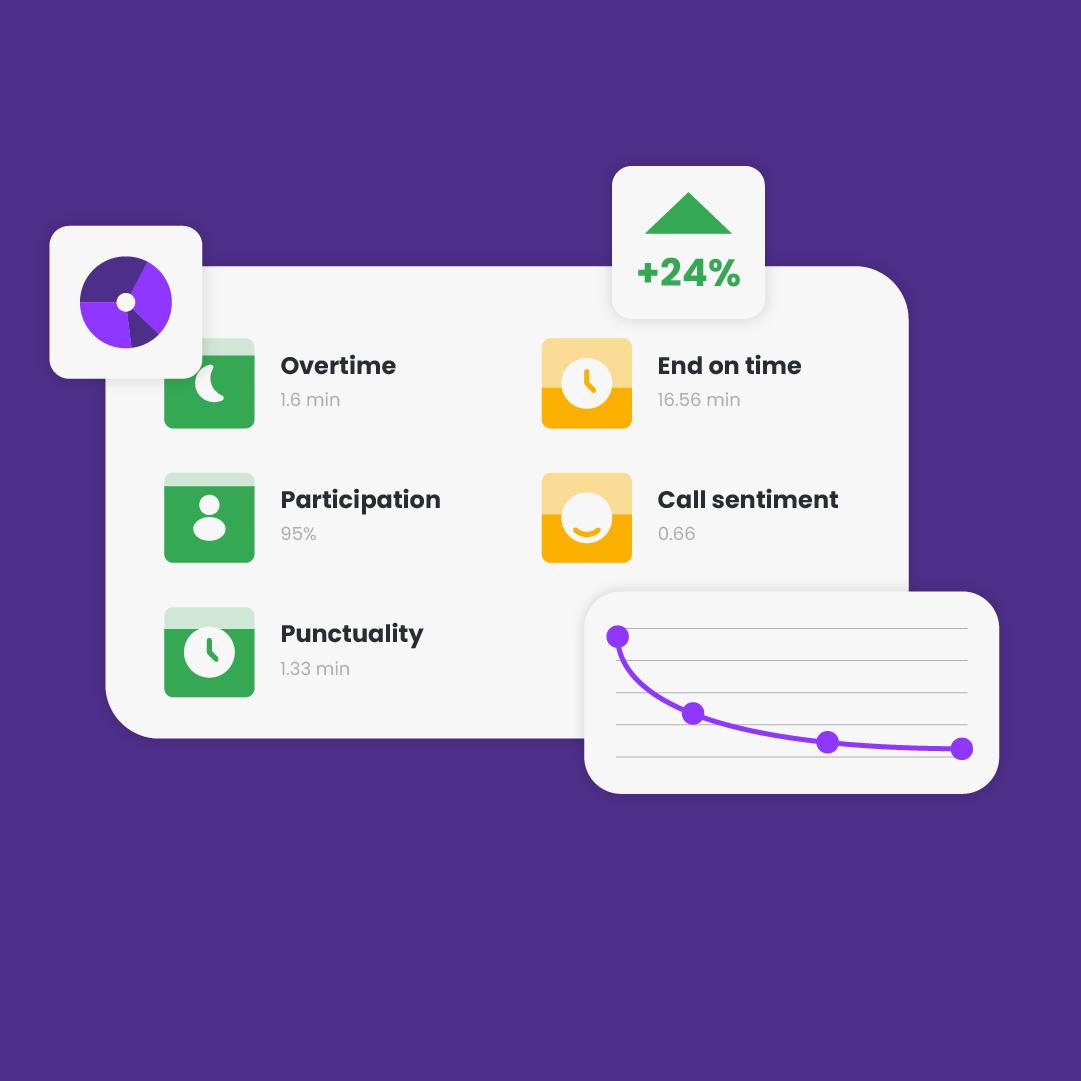
MeetGeek uses AI to handle your meetings. It gives you analysis after meetings, real-time collaboration tools, and sorts key points into Actions, Concerns, or Facts. You can search and share notes easily. It works with HubSpot and other CRMs, giving sales teams direct insights from customer talks.
MeetGeek’s key features
Source: MeetGeek
- Bot or no bot: MeetGeek records without a bot from Chrome or desktop.
- 100+ languages: MeetGeek identifies each speaker and detects the language automatically, on every plan.
- 20+ meeting templates: MeetGeek shapes the summary to your template, on Pro up.
- Mobile recording: The mobile app records in person conversations and interviews, iOS and Android.
- Recording notice: MeetGeek posts a chat notice, with consent notifications on Business.
MeetGeek’s pricing
- Basic: 0 dollars per month
- Pro: 15.99 dollars per user per month
- Business: 27 dollars per user per month
- Enterprise: Custom pricing
What MeetGeek users love
Accurate transcription when the team are not native English speakers
“We needed a tool that could accurately capture meeting notes, and MeetGeek has consistently provided the accurate transcriptions we were looking for. Many of our team members are not native English speakers, yet the tool captures it.” Elis L., G2
Your own branding on the notes that go out to clients
“I love how easy it is to use, I also love the customization if offers allowing us to put our own branding in the post meeting emails sent out to clients we meet with.” Amanda G., G2
What MeetGeek users flag
Removing your name from the bot needs the Business plan
“Needed the business plan to not have it named "[My name] 'Meet Geek bot" in the zoom meeting. I did not want everyone to feel watched with the bot.” Verified User in Hospital & Health Care, G2
One reviewer waits half an hour for the bot to join
“Takes a while to join new meetings. I.e. when I create a meeting, meetgeek takes 30 minutes to join.” Siyuan W., G2
9. Fathom: Best Meeting Minutes Software With Unlimited Free Recordings
Best for: Fathom is the meeting minutes software for anyone who wants unlimited recordings without paying first.
Similar to: Otter.ai, Fellow, Fireflies.ai

Source: Fathom
Fathom is designed to record meetings and send a meeting summary along with the action items directly to your email immediately after the call. Meeting recordings can be made with either a bot joining the call, or without a bot present. Fathom is SOC 2 Type II compliant, GDPR compliant, and HIPAA compliant.
Fathom’s key features

Source: Fathom
- Bot free capture: Fathom offers bot free capture on every plan, Mac beta.
- Unlimited recordings free: Fathom records unlimited calls, with limited use of advanced summaries.
- Ask Fathom: You question your meetings, with free limited to two weeks.
- CRM and task sync: Notes sync to Slack, Salesforce, HubSpot and Asana.
- Security certifications: Fathom is SOC 2 Type II, GDPR and HIPAA compliant.
Fathom’s pricing
- Free: 0 dollars per month
- Premium: 20 dollars per user per month
- Team: 19 dollars per user per month, two user minimum
- Business: 34 dollars per user per month, two user minimum
- Enterprise: Custom pricing
Source: Fathom
What Fathom users love
Meeting recording and AI a small business can afford
“Fathom is doing an amazing job by giving small businesses an option for meeting recording and embedded AI. It also helps with meeting transcripts, which is wonderful.” Hamza Y., G2
The notes come back accurate enough to keep
“Fathom has been very helpful, because it's made taking notes during our meetings much easier. The notes are accurate as well.” Krisitine G., G2
What Fathom users flag
The summary email can arrive the next day
“My only concern is that sometimes I don't receive the email right after the meeting ends; it ends up arriving in my inbox the next day.” Shreeyash G., G2
You go back to the recording when people talk over each other
“Sometimes the transcript isn't completely accurate, especially when people talk over each other or the audio isn't clear. I also sometimes have to go back to the recording to check the context.” Mia C., G2
10. OnBoard: Best Meeting Minutes Software for Board Motions, Votes and Approval
Best for: OnBoard is the meeting minutes software for a board that records motions, votes and attendance, on Premium up.
Similar to: Diligent, Boardable, BoardEffect
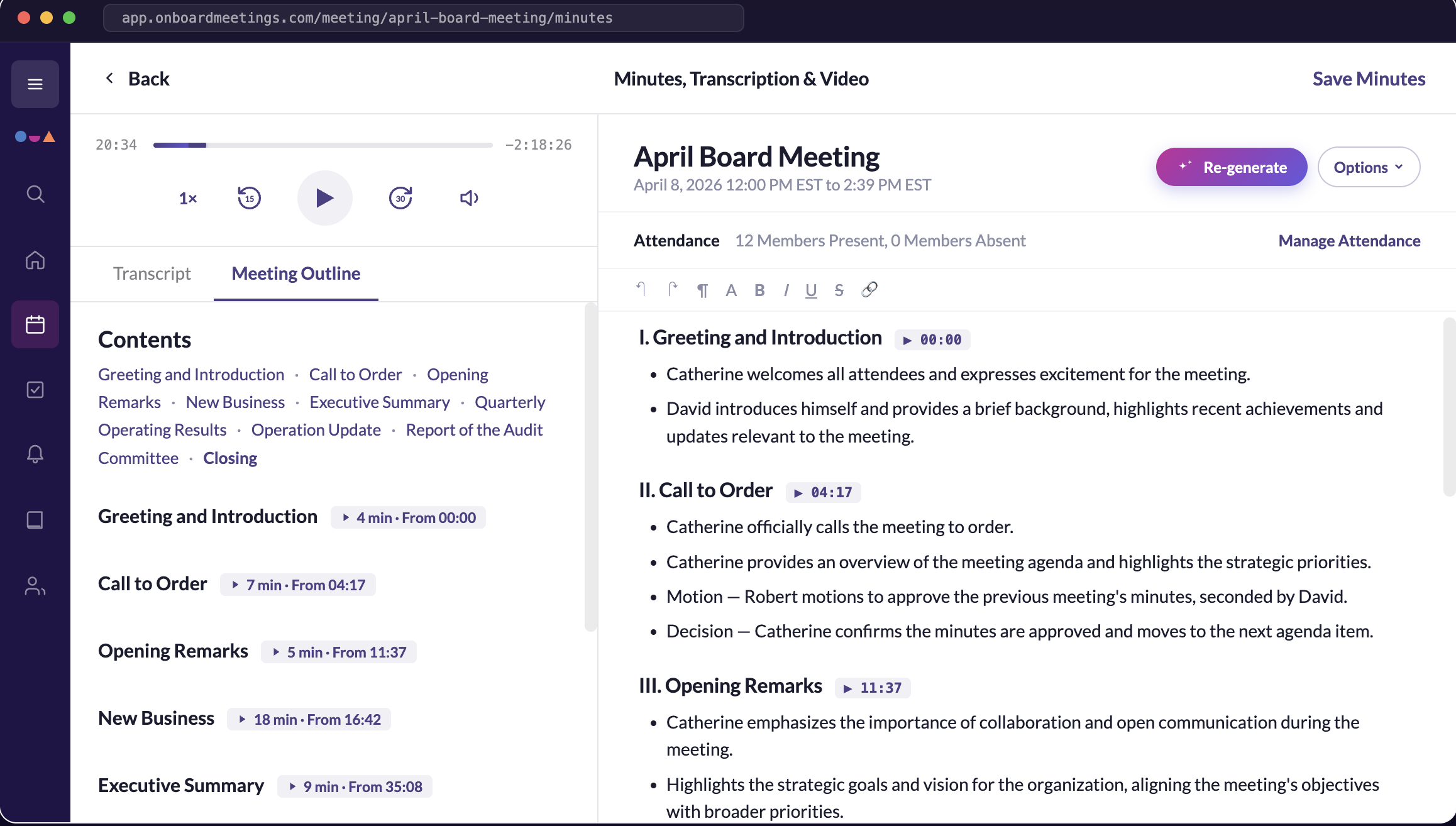
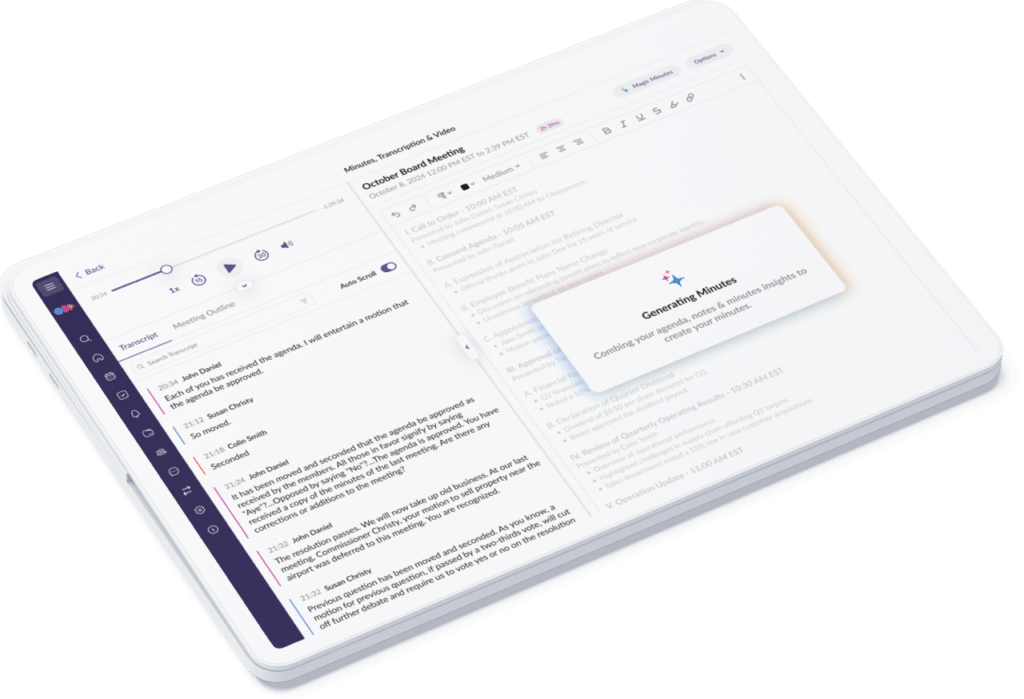
A board portal called OnBoard uses AI Minutes which will automatically draft minutes using the recordings from either a Zoom or Teams meeting. While the meeting takes place you can record attendance, motions and votes. After the meeting, the AI drafted minutes can be edited by you to produce your final version. Your minutes attach to the next agenda for approval and they will publish as either a Word document or a PDF.
OnBoard’s key features
- Motions and votes: OnBoard logs motions, votes and tasks live, on Premium up.
- Attendance marking: You tap to mark attendance and keep minutes aligned to the agenda.
- AI Minutes: OnBoard transcribes Zoom and Teams meetings and drafts minutes, an add on.
- Approval and eSignatures: Minutes attach to the next agenda, eSignatures from Premium.
- Word and PDF export: Minutes publish to the resource center with an audit trail.
OnBoard’s pricing
- Essentials: On request
- Premium: On request
- Ultimate: On request
OnBoard has no public pricing. Instead all three of the plans have links to Get Started, Learn More, and Talk to Sales, along with a free trial. The figure comes from their sales team.
What OnBoard users love
Board materials, agendas and minutes in one place
“I like how OnBoard keeps board materials, meeting agendas, minutes, and communications organized in one central location.” Athena W., G2
An interface a board can actually use
“The user interface of OnBoard is one of the best software platforms for boards that I have seen. As an admin, it was easy to set-up on the back-end and then implement with our board.” Jessica G., G2
What OnBoard users flag
Emails still reach the board when the setting says not to
“The biggest one for me is email control. Even when we have notifications set to not automatically email the board, emails still go out. It's most annoying when we're adjusting meeting times or making agenda changes.” Steve S., G2
Board members have trouble logging in to the Zoom call
“I wish the integration with Zoom was a bit smoother. There are times when the information entered for the board meeting seems to show incorrectly so members have issues logging in.” Erika R., G2
Final Verdict on What’s the Best 10 Meeting Minutes Software?
Jamie is the best meeting minutes software for a European team that has to produce the official record: nothing joins the call, the meeting audio is deleted once the transcript exists, and all meeting data is stored and processed in Europe under GDPR.
You can also pick a different tool when the job is different:
- Choose Fellow when your recording policy is set centrally.
- Choose Fireflies.ai when you search back through months of calls.
- Choose Avoma when your revenue team also wants call scoring.
- Choose Otter.ai when you want to question all your meetings.
- Choose ClickUp when your projects already live inside ClickUp.
- Choose tl;dv when your summaries need one fixed format.
- Choose MeetGeek when your meetings run across several languages.
- Choose Fathom when you want unlimited recordings without paying first.
- Choose OnBoard when the meeting is a formal board meeting.
Our Picks for the Best Meeting Minutes Software
Jamie is who we would recommend to help you with your meeting minutes if those are based on an actual meeting. We truly believe the other two are genuinely good at the jobs they were built for. So you can see which one is yours.
Jamie, the meeting intelligence platform: you record the meeting off your own laptop, consent first and no bot joining. And you get Executive Level AI Notes, Conversational Intelligence, an agent that acts in your tools, and your data in Europe under GDPR.
Microsoft Word, the document editor: you ask Copilot to turn a transcript you already have into meeting notes, with automatic headings for attendees, agenda items and follow up actions, and minutes templates in the gallery.
Sonix, the file transcription platform: you upload the recording you already made and get it back at 99% accuracy across 54+ languages, with speaker diarisation naming who said what, and ask questions across every file.
Read More
- Minuting a board meeting? Read board meeting minutes.
- Buying for a European team? See AI meeting minutes tools in Europe.
- Rolling this out across a large company? See enterprise meeting minutes tools.
- Most of your meetings held in a room? Read AI note takers for in-person meetings.
- Signing this off for a law firm? Read AI note takers for lawyers.
Frequently Asked Questions About Meeting Minutes Software
Can ChatGPT Take Minutes of a Meeting?
Yes. You provide ChatGPT with a copy of the meeting transcript and tell it to generate minutes. It will pull out all of the decisions that were made during the meeting along with the action items and lay them out. What is left to do after this is capture the meeting itself and review what is returned. Jamie records the meeting using your own device and generates minutes that name every person who spoke, on every single plan.
What Is the Best App for Taking Meeting Minutes?
Jamie is the best meeting minutes software for a European team that has to produce the official record. Nothing joins the call, you obtain verbal consent in your own words, and the meeting audio is deleted once the transcript exists. Fellow, Fireflies.ai, Avoma, Otter.ai, ClickUp, tl;dv, MeetGeek, Fathom and OnBoard each answer a different job. Jamie keeps all meeting data in Europe under GDPR.
Is There a Meeting Minutes Template in Word?
Yes. Microsoft offers several Word documents that are called meeting minutes templates; they are titled Classic minutes, Team meeting minutes and Educational meeting minutes. You can ask Copilot to transform a conversation transcript into notes within the document. And Jamie will apply a template to the summary so that the minutes end up in your own sections, with 30+ pre-built templates available on all plans.
Are Meeting Minutes Legally Required?
Yes. For a board of directors of a company. Section 248 of the Companies Act 2006 stipulates that all companies shall cause minutes to be entered of all proceedings at meetings of their directors. These minute records shall be retained by the company for a period of at least ten years. If a company does not retain such records, it has committed an offence through each officer in default. Jamie generates the draft, however, the sign off remains with you.
Is an AI Transcript the Same as Meeting Minutes?
No. Transcripts record everything that is said during a meeting whereas minutes record what decisions were made from the same meeting. According to Robert's Rules of Order it is improper to summarise the discussion in the minutes. The Chartered Governance Institute says minutes should not be a verbatim record. Jamie generates the minutes and deletes the meeting audio once the transcript exists.
What Is the Best Way to Capture Meeting Minutes?
Record the meeting, have the software write the minutes, review them first before anyone else sees them. Check to see if everything was decided, who owns each decision, correct anything that the software got wrong, and send them. For a board of directors, the minutes will be approved at the next meeting and the recording will be erased once they are. Jamie drafts the minutes and leaves the proof reading and final approval with you.
Is There a Free Meeting Minutes Generator?
Yes. Jamie's free plan covers 10 transcribed AI notes per month, and each meeting is capped at 30 minutes. It also comes equipped with many other features including Ask AI, speaker identification and memory, in-person meetings and 100+ languages. There are also free plans from Fathom, which allows unlimited recordings, and from Fireflies.ai, Otter.ai, ClickUp, tl;dv and MeetGeek, which offer varying amounts with their own limits. On Jamie's free plan nothing joins your call and the audio is deleted after transcription.
How Do I Convert a Transcript Into Meeting Minutes?
Remove all the extraneous information from the transcript by pulling out only the decisions made during the meeting, assign an owner to each action item along with a due date, and remove all the rest. This process can take some time as a transcript is typically lengthy while a set of minutes is generally very brief. Jamie will complete this task for you with all of the decisions separated from the action items, and Jamie will identify each speaker.
Do I Have to Tell People the Meeting Is Being Recorded?
Yes. In Germany, section 201 of the Criminal Code makes recording the non-publicly spoken word without authorisation punishable by up to three years. Our documentation says that informing participants remains your responsibility. Jamie discloses the recording in three ways. You can get a participant's verbal consent using your own wording. You can enable the optional Automated Recording Notice email, which alerts participants before the meeting. And you can enable the meeting chat notice that sends a message within the call to alert participants that they are being recorded.
Is Meeting Minutes Software Safe for a Confidential Meeting?
This depends upon how much of the information the vendor retains post-recording. The recommended governance approach for deleting recordings is to do so as soon as possible after the minutes are approved. Transcribed records from candid discussions may be considered discoverable in legal proceedings. Jamie is GDPR compliant and ISO 27001 certified, and stores all meeting data in Europe. Jamie does not train models with recordings of your meetings or retain them past transcribing.
What Is The Best Free AI Meeting Minutes Software That Doesn’t Join My Call?
Jamie is a free AI note-taking app that records your meeting audio and turns it into clear meeting minutes including transcripts, summaries and action items, without joining your call as a bot. It runs on your device in the background, works on any meeting platform online or offline, supports 100+ languages and ensures your privacy with strong encryption.
Can the Software Assist in Creating and Customizing Meeting Agendas and Minutes?
Yes, Jamie helps structure and customize meeting minutes, though agenda creation is currently manual.
Does the Software Integrate With Other Tools Like Calendars and Email Systems?
Yes, Jamie, it can be integrated with your Google calendar and Outlook calendar. You can also integrate it with your Gmail account.
How Does the Software Handle Attachments and Additional Documents?
Currently, Jamie focuses on audio transcription and does not handle file attachments.
How Is Data Privacy and Security Managed?
The audio is deleted after transcription. Fully GDPR compliant and do not send bots inside your meetings.
Does the Software Use Artificial Intelligence to Automate Note-Taking or Summarization?
Yes, AI is used to generate summaries, notes, and structured minutes automatically.
Is Manually Taking Minutes Still Time-Consuming With This Tool?
No, Jamie reduces the need for manual minute-taking significantly.
What Additional Features Are Included Beyond Basic Minute-Taking?
AI-powered summaries, action item extraction, speaker identification, intelligent topic detection, real-time AI assistance.

![Best 10 Airgram Alternatives & Competitors [Updated September 2025]](/_next/image?url=https%3A%2F%2Fwww.meetjamie.ai%2Fapi%2Fmedia%2Ffile%2FBest_10_Airgram_Alternatives_Competitors_Updated_September_2025-vro4md.png%3Fprefix%3Dpayload%262025-09-26T08%253A08%253A33.958Z&w=3840&q=75)